UDUN WALLET · FOR BUSINESS & PERSONAL ASSETS

From everyday business payments to offline custody and teamwork.
Explore UDUN products and find the wallet that fits your needs.

Guard against hackers.Protect against insiders.

Clearer asset management. Greater peace of mind.

✓Product selection · Integration advice · Setup guidance
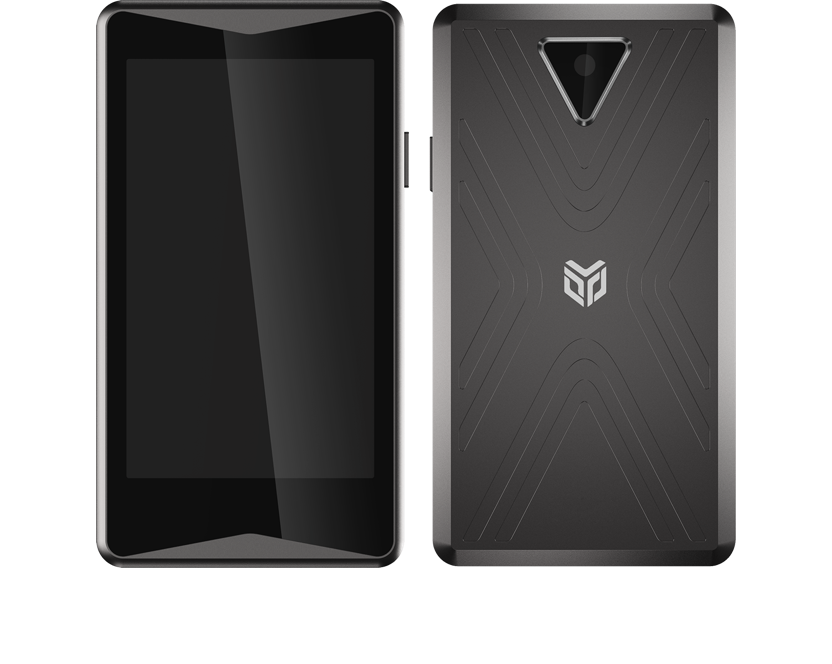
Front and back of the Udun Cold T1 hardware wallet
◇
Sign offline. Verify on-device.COLD WALLET · Udun T1
✓
Choose how you manage assetsBusiness / Multisig / Hardware
UDUN COLD T1 · HARDWARE WALLET
Assets and networks listed by the manufacturer
₿Bitcoin
◆Ethereum
₮USDT · TRC20
▽TRON
✕XRP
Compatibility notes→
01 / PRODUCTS

Different needs. The same attention.

Personal custody, business payments and shared control.
Start with your use case and find the right product.

BUSINESS WALLET Business payments

UDUN Business Wallet

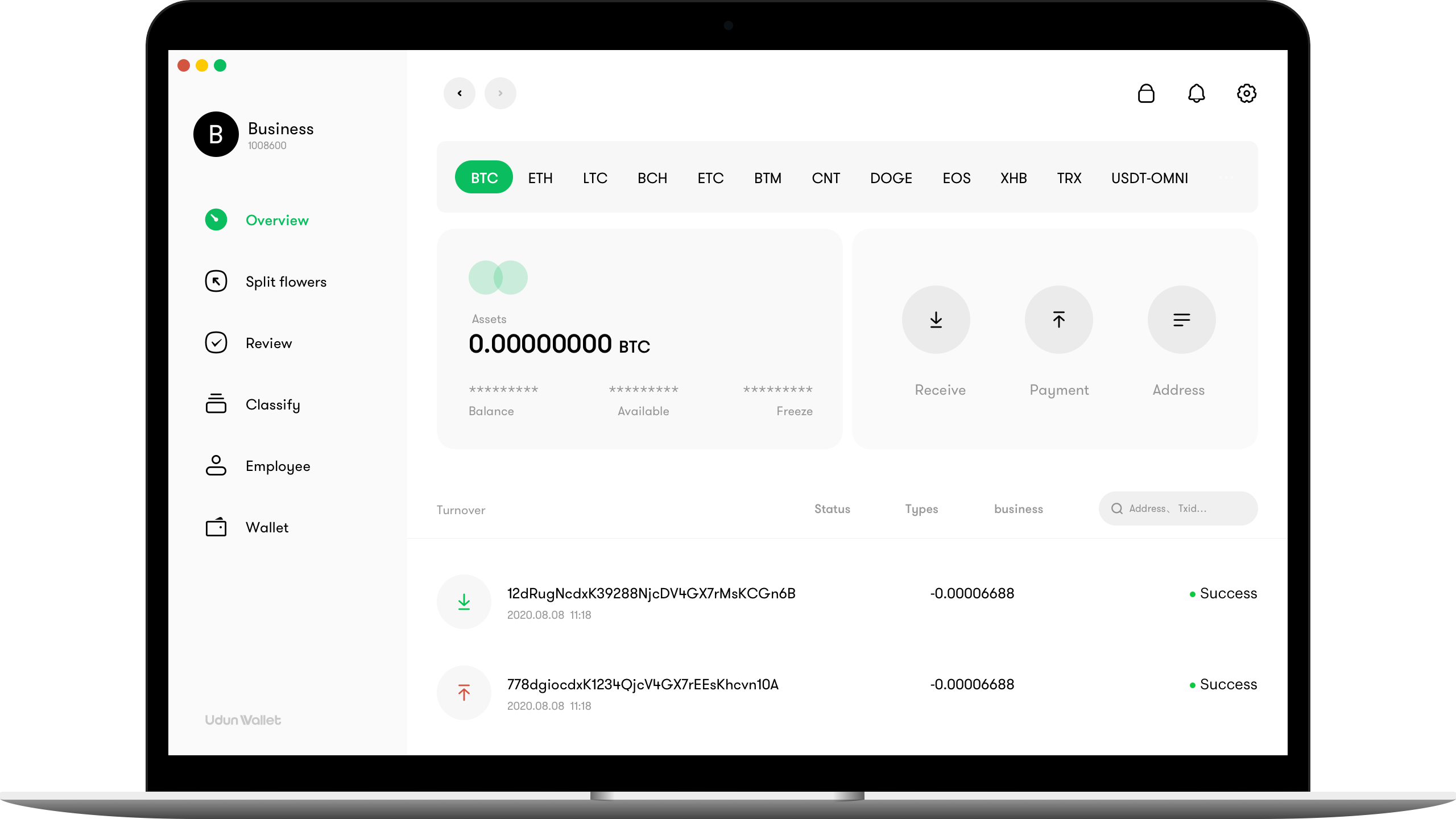
View multiple addresses and assets together, with transaction reviews, consolidation and business integration.

UDUN Business Wallet desktop interface
TEAM COLLABORATION Shared management

UDUN Multisig Wallet

Manage assets with multiple participants and define clear roles for transaction confirmation.

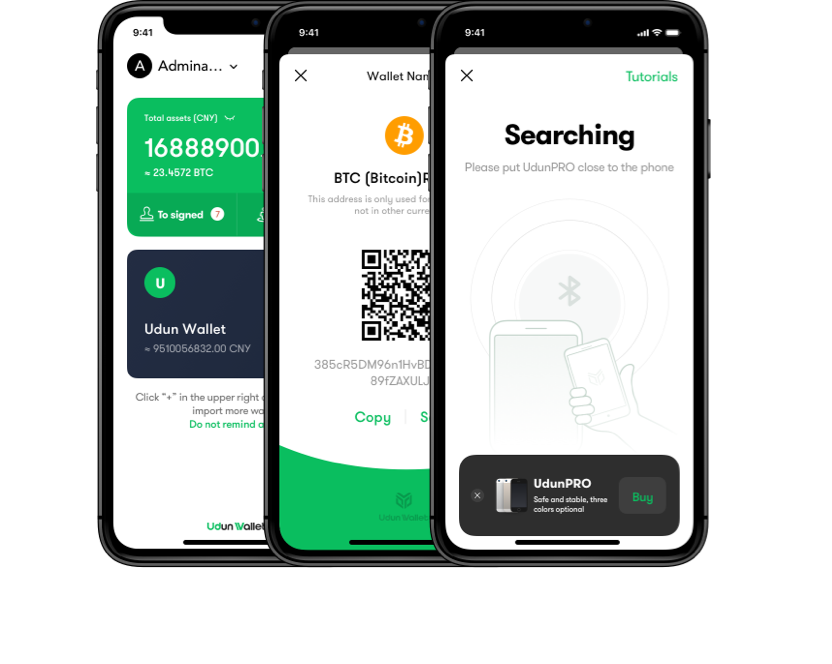
UDUN multisig wallet interface
UDUN BUSINESS WALLETManufacturer’s product interface
UDUN asset and transaction management interface
AddressesTransaction reviewAsset consolidation
02 / BUSINESS WALLET

From a single payment
to coordinated operations.

Bring addresses and daily tasks together so finance, reviewers and developers can focus on their roles.

  • View multiple assets and addresses together
  • Set initial and secondary reviews by limit
  • Manage consolidation, payments and records
  • Connect your business systems via API
Explore the integration process→
UDUN WALLET 3.0

Asset operations built for teams.

The manufacturer’s 3.0 offering highlights MPC, organizational roles and automation. Confirm migration and compatibility before upgrading or integrating.

Collaborative MPC signing

Distributed key shares work together to sign, reducing single-point risks in key management.

Organizations and roles

Organize accounts, wallet structures and approval duties around your team.

Automation and API

Connect asset operations with your business workflows.Ask about 3.0 →

03 / UDUN COLD T1

Keep critical confirmations
on the device in your hand.

The manufacturer presents Cold T1 as an offline hardware wallet: a metal body, a camera for QR codes and an on-device transaction display.

3.97 inchesLCD display
1400 mAhRated battery capacity
118 × 66 × 9.7Dimensions / mm
QR code exchangeTransaction data transfer

Specifications are from the manufacturer’s product page. Confirm the version, availability and package contents before purchase.

Cold T1 product appearanceMetal body · Dedicated device
04 / MANAGEMENT

Clear rules.
Accountable actions.

Explore the product’s management approach. Features vary by product, version and enabled configuration.

Multiple addresses. One view.

Organize work around balances, records and asset movements, with less switching between screens.

  • Address and asset categoriesUnified management
  • Transaction search and statusAccessible records
  • Consolidate assets across addressesCentralized operations

Managing assets together? Define roles, confirmation rules and recovery plans first.

Ask about multisig & MPC→
05 / DEVELOPERS

From business needs
to a clear integration plan.

Understand the address, transaction and callback APIs. Confirm your product version and obtain matching documentation before integration.

Get version-specific integration resources→
● ● ●INTEGRATION OVERVIEW
// 01 · ADDRESS MANAGEMENT

Prepare the right receiving addresses

  1. Confirm wallet, asset and network
  2. Request addresses for your business needs
  3. Validate address format and ownership
  4. Link business records and callbacks
API purposes and testing preparationDEVELOPER GUIDE ↗
06 / DOWNLOADS & SETUP

Choose how you get started.

App installation and hardware setup are different processes.
Confirm the product version, then use its matching guide.

▣

Desktop & web

For everyday business operations and teamwork.

View setup guidance

Ask the reseller for the official entry point, supported operating systems and version for your product. No installer is provided here.Request resources →

▯

Mobile apps

Check mobile compatibility and installation channels.

View installation notes

For iOS or Android, confirm official distribution channels, system requirements and matching versions.Ask about apps →

◇

Cold T1 device

From unboxing to initialization and backup.

View preparation checklist

Check packaging and device, follow the manufacturer’s setup instructions and keep recovery backups offline. The reseller does not need your seed phrase or private key.Read the FAQ →

Installers, updates and official documents will be added once confirmed. All current guidance opens on this page.

07 / HELP CENTER

Before you buy,
get the answers you need.

Asset support, product differences and services:
start with these common questions.

Still have questions?→
Can I use ETH and TRC-20 USDT?

The manufacturer lists ETH, TRX, ERC20 and TRC20. Confirm your exact product, firmware and token before purchase. USDT on Ethereum and TRON uses different networks; the receiving network must match.

How do business and hardware wallets differ?

Business wallets focus on addresses, payments and team workflows. Hardware wallets focus on key management and confirmation on a dedicated device. Choose by your custody or business needs.

Are multisig, MPC and approvals the same?

No. Multisig uses multiple-signature rules; MPC uses collaborative computation; approvals are business workflows. Check the exact mechanism and recovery procedure in the product’s official documentation.

Where can I confirm pricing, stock and delivery?

Contact the reseller on Telegram with your product, quantity and region. Confirm pricing, stock, delivery and after-sales terms. This page does not collect payments.

Do I need to send my seed phrase to support?

No. Never share seed phrases, private keys, recovery files or signing authorizations with a reseller or support agent. Set up and back up the device yourself using official instructions.

Is this the official UDUN website?

This is Chengyu’s reseller showcase, not the manufacturer’s website. Product names and images identify the products offered. Chengyu is a provisional trading name; final business details are pending.

08 / LEARN MORE

Choose a product. Understand how to use it.

Practical notes on choosing and managing a wallet.
Expand the articles without leaving this page.

SELF CUSTODY
01 / THE BASICS
◇
Personal custody

What does a hardware wallet actually store?

Read more ↗

Assets are recorded on the blockchain. Wallets manage the keys used to sign. A dedicated device helps isolate keys, but you must still verify the address, network and amount. Recovery depends on your backup; anyone with it may control the assets.

TEAM OPERATIONS
02 / CHOOSING A WALLET
◎
Business collaboration

Which rules should your team define first?

Read more ↗

Define who initiates, who reviews and which amounts require additional approval. Plan role handovers, recovery and activity records. For multisig or MPC products, verify the signing mechanism separately from business approvals.

START WITH WHAT YOU NEED

Find your fit
with UDUN products.

Tell us which assets you use, whether it is personal or business, and if you need shared control. Ask about products, pricing and delivery on Telegram.

Product advice Pricing & stock Integration advice
TELEGRAM · RESELLER CONTACT@iu0808Contact on Telegram↗

Opens Telegram so you can start a conversation

Chengyu · UDUN Product Reseller

Product selection and purchase inquiries for individuals and businesses. This reseller preview follows the manufacturer’s version-specific product information. Final business identity, service scope and after-sales terms will be added before publication.

Telegram contact